Saturday, May 10, 2014

OSPF External Path Selection, TCL PING Scripting

Lessons Learned:

Redistribution from the RIP process into the OSPF process
When the RIP router originates routes as long as the OSPF area is a normal area these are going to be TYPE 5 LSAs in the OSPF database.  Either the E1 or E2 routes, By default the routes will show as E2 and the default metric is 20.

Under the OSPF process –
We simply say –

R4(config-router)#redistribute rip
% Only classful networks will be redistributed (this is a backwards compatibility feature – only clasful summarize will be included in the OSPF database)
R4(config-router)#

This will advertise the RIP routes with the default values.  To remove the classful subnets we need to add the keyword “subnets to the redist – process.

R4(config-router)#redistribute rip subnets
This should advertise anything running RIP including the connected interfaces running RIP into the OSPF database- TYPE 5 LSA”s

                Type-5 AS External Link States

Link ID         ADV Router      Age         Seq#       Checksum Tag
192.168.47.0    192.168.47.4    192         0x80000001 0x00C0AA 0

Or we can view the External
  LS age: 231
  Options: (No TOS-capability, DC)
  LS Type: AS External Link
  Link State ID: 192.168.47.0 (External Network Number )
  Advertising Router: 192.168.47.4
  LS Seq Number: 80000001
  Checksum: 0xC0AA
  Length: 36
  Network Mask: /24
        Metric Type: 2 (Larger than any link state path)
        TOS: 0
        Metric: 20
        Forward Address: 0.0.0.0
        External Route Tag: 0

All other OSPF routers in the topology should show the RIP routes as E2 routes:

R3#sh ip route
O E2 192.168.47.0/24 [110/20] via 10.1.43.4, 00:04:24, FastEthernet0/0

Also if we show the RIP route specifically

R3#sh ip route 192.168.47.0
Routing entry for 192.168.47.0/24
  Known via "ospf 1", distance 110, metric 20, type extern 2, forward metric 1
  Last update from 10.1.43.4 on FastEthernet0/0, 00:06:14 ago
  Routing Descriptor Blocks:
  * 10.1.43.4, from 192.168.47.4, 00:06:14 ago, via FastEthernet0/0
      Route metric is 20, traffic share count is 1

This says – the metric is 20 the type is 2 and the forward is 1 – the forward is to get to the ASBR.
This is a function of the E2 routes. They separate the seed metric plus the metric to the ASBR.
Note: the farther away from the ASBR the Forward metric will increment. If there is ever a tie in the E2 routes, we will look at the forward Metric for the best path.

Note: if we set these routes as External type 1 routes, then there’s no difference between the metric and the forward metric. The only time this really matter is when there are multiple exit points for the domain.

We can set the metric type during redistribution.
Verify –
We need to verify can we reach the destination from the other protocol.
R3#ping 192.168.47.7

Type escape sequence to abort.
Sending 5, 100-byte ICMP Echos to 192.168.47.7, timeout is 2 seconds:
!!!!!
Success rate is 100 percent (5/5), round-trip min/avg/max = 16/32/44 ms
R3#

And I can reach my RIP router. If we can reach the destination we can assume the redistribution is correct. If the Routing domain is large there would be a lot of checks.
For Verification of a large domain we can use TCL scripts

TCL – stands for the Tool Command Language – this is an open standards language.
IOS – supports TCL 8.3.4
-99% of programming is outside the CCIS scope
-useful in redistribution for automating PING scripts

Only problem with TCL Scripts is the syntax has to be exact and there’s not a real reference guide

TCL PING Script Example:
R3#tclsh  (staring a TCL Shell)
R3(tcl)#foreach X {  (this says create a forloop and define a variable X, for each value that X has, run the ping command for the variables value. )

Ex:
tclsh
#foreach x {            
+>(tcl)# 10.1.43.4
+>(tcl)# 192.168.47.7
+>(tcl)# 172.16.41.1
+>(tcl)# 10.1.16.6
+>(tcl)#} { ping $X }


The end result is it will ping these IP’s in order. 

Friday, May 9, 2014

Route Redistribution Overview


Lessons Learned:

----------------------------------------------------

What routes are redistributed

How connected redistribution works

How IOS chooses routes to use

Why Routing loops can occur

How to identify routing loops

How to prevent routing loops

----------------------------------------------------

Route Redistribution –

Redistribution occurs from the routing table not the routing database.

When redistributing protocol X into Y, take.

-Routes in the routing table via protocol X

-Connected interfaces running protocol X

Route advertisement rules

-RIP vs EIGRP Vs OSPF VS BGP
 
Note the key point to understand is that the process of route redistribution occurs from the routing table and not the database.

Example – what’s installed in the EIGRP topology Vs what actually goes into the routing table.

When going between two protocols – taking source protocol X and putting it into Protocol Y, The router will first look at two things.

Ex: what are the routes actually installed in the routing table via that protocol and what are the connected interfaces, in the routing table that are running that protocol.
The first – in the case of EIGRP – what are the dynamic routes coming from our connected peers. Internal or external routes.

The connected interfaces – this will be based on the network statement that is running under the process.

So if we look at the “show IP protocols”, this will show us what are the connected links that care candidate to be redistributed between the processes.
 
Depending on the protocol – there are rules on what particular routes we can install in the table. And what routes we can advertise.

Connected Redistribution:
Implicitly occurs for connected links running the redistributed protocol

Additionally connected links can explicitly be include or excluded
-# redistribute connected (metric ) route-map.
-overrides implicit redistribution

When redistribution happens,. The router will be looking for two things, any dynamic routes in the routing table via that protocol. Then implicitly any interfaces that are running that process.

If we do not use the redistribute connected command, any interfaces in the source protocol that are directly connected will be redistributes into the destination protocol.

Note: there could be an issue – if we do explicitly list what links will be redistributed from the connected process – this will override what the implicit redistribution is.

We need to treat the dynamic routing process and the connected routing process as two different entities form the perspective of redistribution. As long as we do not manually issue the redistributed command – we should then assume that any interfaces running that protocol will be sent into the destination protocol.
 

How IOS chooses Paths:
Routing database choses one or more candidate paths.

-EIGRP via DUAL, OSPF via SPF, etc

-Load balancing via Maximum-paths.

If multiple equal matches between protocols…

-choose the lower administrative Distance

Install results in RIB and/or FIB.

Router will look through the database and find the actual paths that can go into the routing table. Then the router will look are there multiple matches for the exact prefixes from the different protocols.

|Ex: if we have a prefix 1.2.3.0 /24

And we’re learning it via both EIGRP and OSPF, then we will have to choose which one actually goes into the routing table. This will be based on the AD value. The lower AD will be candidate to go into the

RIB (routing table) and the FIB (the CEF table)

AD Values:

0 = Connected
115 = IS-IS
1 = Static
120 = RIP
5 – Eigrp Summary
160 = OD
90 = EIGRP internal
170 = Ext EIGRP
110 = OSPF
200 = Internal BGP
 
255 Infinite

 
Ex: if we’re learning and External OSPF route and an External EIGRP route, and they’re equal longest matches for the same destination

We would prefer to install the OSPF route and not the External EIGRP route.

This could be an issue because the advertising rules for EIGRP and RIP are different than OSPF and BGP. The Distance vector protocols can only advertise routes that get installed into the routing table.

OSPF and BGP do not have this limitation because with OSPF, all routers in the flooding domain have to have the same copy of the database. BGP – the candidate routes are the ones that will the BGP best path selection process.

RIP Redistribution – V2
Doesn’t differentiate between internal and external routes.

-Administrative distance of 120 for all routes

No default seed metric

-#redistribute (protocol ) metric (hops)

-#default-metric (hops)

There’s cases where RIP does not choose the correct path because the router cannot distinguish between internal and external routes.

There’s no way to separate in the routing process an internal RIP distance between an External RIP distance.

When we redistribute into RIP, OSPF or EIGRP into RIP – there is NO default seed metric or see hop count.

This means that we need to either specify globally under the process with the default Metric command or specifically for that protocol.

Example: RIP
# redistribute OSPF 1 Metric 5
# redistribute EIGRP 1 Metric 3

Either globally or individual protocol – if we do not specify the metric the routes will not be populated into the RIP database

Can verify this with the

#sh RIP database – this will tell us locally on the router that is doing the redistribution whether the process is actually occurring properly.

So if we Redistributed EIGRP into RIP – and we do not see the EIGRP routes as redistributed, then we know there could be an issue with the Metric or the routes are being filtered.

EIGRP Redistribution –
AD of 170 for external EIGRP
-Helps to automatically prevent route feedback.

Used Router-ID for loop prevention

No default seed metric unless EIGRP to EIGRP

#redistribute (protocol) metric (bandwidth) (delay) (load) (reliability) (MTU)

-#default-metric (bandwidth) (delay) (load) (reliability) (MTU)  

EIGRP – does differentiate between internal or External routes.
90 = Internal
170 = External

The idea behind this is if we have an external EIGRP route -

And some other IGP learned route for the same match.

If we learn the route through external EIGRP- this will be the least preferred path.  Because of the AD.

Note: EIGRP uses the router-id value for loop prevention of external prefixes. If our EIGRP Router-ID is 1.2.3.4 – when we redistribute OSPF into EIGRP – the EIGRP External prefixes are going to be tagged with the router-ID of 1.2.3.4 

This then means if the routing update leaves locally and goes out to some of the peers, then comes back in from another EIGRP neighbor – we’re going to discard the route. Any time you learn an external EIGRP route that has your route-id as the originating router the process is automatically going to deny this.

Just like RIP – EIGRP does not have a default seed metric unless we’re going through two spate EIGRP processes. EIGRP AS 1 and EIGRP 2 on same router – the individual composite values will be exchanged on a prefix by prefix basis, Load delay, mtu, etc – will be exchange

However if were coming from another protocol like OSPF into EIGRP.
We do need to manually specify what the seed metric value is.

We can use the redistribution under the process with the Redist protocol or set the default-metric.

There is also cases where if there is only a single point of redistribution – the seed metric value is not going to matter. Because if we have only one physical path form the RIP to EIGRP – it really doesn’t matter what the seed metric is. The Seed metric is really only going to matter when there is multiple points of redistribution and we’re doing traffic engineering or route filtering.


OSPF Redistribution -

AD of 110 for all OSPF routes

Uses router-id for flooding loop prevention

Default seed metric 20 and metric-type E2 / N2

OSPF path selection preference
-E1 > E2 > N1 > N2
-E1 & N1 vs E2 & N2 metrics

Does distinguish between external and internal, all will be assigned an AD of 110. This means OSPF will prefer the AD of 110 over the External EIGRP or RIP AD’s.

Under the routing process on the command line we can manually specify the AD for the External vs internal routes if we want to.

By default OSPF will choose the intra-area routes over the Inter-area routes and over E1 > E2 > N1 > N2

So regardless of metric value, etc – if we have an E1 route VS and N1 (NSSA) route we will always have to choose the E1 route

In OSPF the only time the redist route is going to matter is if we have multiple external matches of the same type prefix – then we use the metric. Ex two E1 routes of two E2 routes.

Does have default see of 20 – and default metric of E2 into a normal area and N2 into an NSSArea. These can be manually changed.

OSPF will use the route-id to prevent routing loops. Although OSPF is not a distance vector protocol.

BGP Redistribution –

Uses ORIGIN code Incomplete.

Normal EBGP and iBGP have no loop prevention

IGP to BGP

-Denies OSPF external routes by default

--- redistribute ospf (Pid) match internal external

BGP to IGP
-EBGP routes allowed, iBGP routes denied by default

-#bgp redistribute – internal

-legacy sysnc rule

-can cause a routing loop


BGP does Distinguishes between internal and external routes in two ways.

First is going to be based on the origin code that is set to incomplete or ? when you look at the #sh ip bgp.

BDP best path selection will prefer routes internal to the network – the ones that are configured under the network statement in the BGP process over the redistributed routes. Origin code for internal is a lower case “i

If all routes being equal – we will look at the origin code – the lower will be preferred IGP over incomplete.

For loop prevention we will use the same rules for normal ibgp and ebgp -

EBGP – uses the AS Path information – ex: if my AS is 100 and I receive a route in that has 100 in the path, then discard the update.

iBGP routes – anytime I learn a prefix from an iBGP neighbor, we will simply not advertise that prefix to another iBGP neighbor – unless I am a route reflector.

iGP to BGP – this is the normal way to advertise our internal prefixes to the global BGP network.  Ex: if we have a bunch of OSPF routes that we want to advertise into BGP, we can either use the network statement under the process  or just redistribute OSPF into BGP

The only exception for this by default the BGP process is going to deny the external OSPF routes. The logic is that if the route is external OSPF – it means that it came from some other protocol to begin with.

This only applies to OSPF – if we’re redistributing EIGRP – it will allow both the Internal or External routes to go.


Now going from BGP to IGP – in order to prevent loops inside our own internal ibgp network, we’re only going to allow external routes from BGP to OSPF or BGP to EIGRP.


Sunday, May 4, 2014

OSPF Stub Areas, OSPF Totally Stubby Areas, OSPF NSSAs, OSPF Totally NSSAs.

Lessons Learned:

OSPF Filtering Overview

OSPF is an link-state routing protocol
-To calculate identical SPTs everyone must have the same input to the SPF (The LSDB)
-Implies that filtering cannot be configured within an area

Inter-are filtering through
-Stub areas
-LSA 3 Filter
--------------------------------

Used to control the specific LSA types that are allowed to pass through certain areas, or in the case of LSA 3s the specific routes that are allowed to pass through certain areas.

The issue with OSPF and filtering, is that everyone in the area needs to have the same copy of the LSDB. In order to get the same result of the SPT (shortest path tree). This mean that we cannot do filtering within the area but we can between areas as long as everyone inside the Link-state area has the same copy of the DB.

Stub Areas are one feature that can be used to accomplish this type of filtering.

OSPF Stub Areas.
Stub areas used to limit type of LSAs allowed to enter an area.
--Intra Area routes (O)
---LSA 1 & 2 (LSA1 = Router LSA / All links in an area |  LSA2 = Network, generated by the DR)
-Inter Area routes (O IA)
---LSA 3& 4 (LSA 3 = the summary of the routing info – moving intra to inter are a routes | LSA 4 = is the inter area reachability for the ASBR )
-External routes (E1 & E2)
---LSA 5  - (Generated by redistribution into OSPF)
-NSSA external routes (N1 & N2)
---LSA 7 (NSSA area routes )
All routers in the must agree on the Stub flag. When doing the Stub area configuration.
So either the area is a normal area an external area or it is an NSSA.

Note: Stub areas are not used to filter on a per-route basis but on a per link state type basis.

OSPF Stub:

Stub Area –
Removes external routes (LSA 5)
Removes ASBR advertisement (LSA4)
ABR  originates Inter-area default route (LSA 3)

Ebanbled on all routers in the area
#Area (area) stub

Note: the overall goal for the Stub areas type, is to inject a default route into them for external information.  This will limit the routes and simply add a default route to the area.
Best used when the ABR is the only physical path to the Area.

The only time when you might not want to do this is when there are multiple exit points out of the area. By removing the area types, it will give them less visibly into diverse paths.

Topology:
----------------


Configuration -
For this – I will configure area 10 as a Stub area, this means  I will need to configure everyone in the area as a Stub…..
So from this Topology I will need to configure R4, R6, R1 and R2 as Stub routers.

R6(config-router)#area 10 stub
R6(config-router)#
*Mar  1 00:09:03.615: %OSPF-5-ADJCHG: Process 10, Nbr 4.4.4.4 on FastEthernet0/0 from FULL to DOWN, Neighbor Down: Adjacency forced to reset
R6(config-router)#
================

R4(config-router)#area 10 stub
R4(config-router)# *Mar  1 00:09:54.287: %OSPF-5-ADJCHG: Process 10, Nbr 2.2.2.2 on FastEthernet0/0 from FULL to DOWN, Neighbor Down: Adjacency forced to reset
*Mar  1 00:09:54.291: %OSPF-5-ADJCHG: Process 10, Nbr 1.1.1.1 on FastEthernet0/1 from FULL to DOWN, Neighbor Down: Adjacency forced to reset
R4(config-router)#
*Mar  1 00:09:57.039: %OSPF-5-ADJCHG: Process 10, Nbr 6.6.6.6 on FastEthernet1/0 from LOADING to FULL, Loading Done
R4(config-router)#

================
R2(config-router)#area 10 stub
*Mar  1 00:11:24.051: %OSPF-5-ADJCHG: Process 10, Nbr 4.4.4.4 on FastEthernet0/1 from LOADING to FULL, Loading Done
R2(config-router)#

================
R2(config-router)#area 10 stub
R2(config-router)#
*Mar  1 00:11:24.051: %OSPF-5-ADJCHG: Process 10, Nbr 4.4.4.4 on FastEthernet0/1 from LOADING to FULL, Loading Done
R2(config-router)#
================

Note: we lose the ADJ because we have to do new flooding of LSAs.

We can now see that we will still have our O routes and our O IA routes but we will not have our E1 or E2 routes.

We will now have a default route that the ABR will be generating to the Stub area:

O*IA 0.0.0.0/0 [110/2] via 10.1.24.2, 00:01:33, FastEthernet0/0
               [110/2] via 10.1.14.1, 00:01:33, FastEthernet0/1
R4#
This should not change to forwarding path, the only difference is the now when we show an IP OSPF Database there should no longer be any TYPE 5 LSAs.

R4#sh ip ospf database

            OSPF Router with ID (4.4.4.4) (Process ID 10)

                Router Link States (Area 10)

Link ID         ADV Router      Age         Seq#       Checksum Link count
1.1.1.1         1.1.1.1         275         0x80000004 0x0010AF 2
2.2.2.2         2.2.2.2         265         0x80000004 0x00CCA3 3
4.4.4.4         4.4.4.4         264         0x80000009 0x0028A2 4
6.6.6.6         6.6.6.6         354         0x80000005 0x0098BD 2

                Net Link States (Area 10)

Link ID         ADV Router      Age         Seq#       Checksum
10.1.14.4       4.4.4.4         270         0x80000003 0x00AA4E
10.1.24.4       4.4.4.4         259         0x80000003 0x006E7C
10.1.46.6       6.6.6.6         354         0x80000001 0x00D7E4

                Summary Net Link States (Area 10)

Link ID         ADV Router      Age         Seq#       Checksum
0.0.0.0         1.1.1.1         285         0x80000001 0x0093A6
0.0.0.0         2.2.2.2         269         0x80000001 0x0075C0
1.1.1.0         1.1.1.1         285         0x80000002 0x006DC8
1.1.1.0         2.2.2.2         271         0x80000002 0x0063CC
3.3.3.0         1.1.1.1         287         0x80000002 0x002FFF
3.3.3.0         2.2.2.2         271         0x80000002 0x00111A
30.30.30.0      1.1.1.1         287         0x80000002 0x005F7E
30.30.30.0      2.2.2.2         271         0x80000002 0x004198
172.16.13.0     1.1.1.1         287         0x80000002 0x007CF2
172.16.13.0     2.2.2.2         271         0x80000002 0x006802
192.168.23.0    1.1.1.1         287         0x80000002 0x00EBCB
192.168.23.0    2.2.2.2         271         0x80000002 0x00C3F0
R4#

========================
Also – we should note that we now have the 0.0.0.0 routes generated by the ABRs. This is the default route that the ABR is advertising,  


OSPF Stub –
Totally Stubby Area
-removes External routes (LSA 5)
-Removes ASBR advertisements (LSA 4)
-Removes Inter-area default route (LSA 3)

Stub enabled on all routes in the area
#Area (Area) stub

Totally Stubby enabled in the ABR9s) of the area
# area (area) stub no-summary

========================

This will replace all the E 1 & 2 routes and even the LSA 3 routes and simply generate a default-route into the area.

So on R1 and R2 – we will need to change the stub area config and add the “no-summary” command.

R1(config)#router ospf 10
R1(config-router)#area 10 stub no-summary
------------------------------------------------------
R2(config-router)#area 10 stub no-summary

Now from the database –

R4#sh ip ospf database

            OSPF Router with ID (4.4.4.4) (Process ID 10)

                Router Link States (Area 10)

Link ID         ADV Router      Age         Seq#       Checksum Link count
1.1.1.1         1.1.1.1         1002        0x80000004 0x0010AF 2
2.2.2.2         2.2.2.2         991         0x80000004 0x00CCA3 3
4.4.4.4         4.4.4.4         990         0x80000009 0x0028A2 4
6.6.6.6         6.6.6.6         1081        0x80000005 0x0098BD 2

                Net Link States (Area 10)

Link ID         ADV Router      Age         Seq#       Checksum
10.1.14.4       4.4.4.4         997         0x80000003 0x00AA4E
10.1.24.4       4.4.4.4         986         0x80000003 0x006E7C
10.1.46.6       6.6.6.6         1081        0x80000001 0x00D7E4

                Summary Net Link States (Area 10)

Link ID         ADV Router      Age         Seq#       Checksum
0.0.0.0         1.1.1.1         73          0x80000002 0x0091A7
0.0.0.0         2.2.2.2         34          0x80000002 0x0073C1
R4#

The size of the DB is reduced and we now have only zero routes for form the ABRs. The only routes we should have are from routes within our own area.

The potential issues we could run into with the Stub area or the Totally stubby area. Is that since we’re filtering out the type 5 externals. It would not be valid to have a stub area that has other external information being redistributed into it.

Example, is if the stub area had other IGP routes being learned – EIGRP for example – These would not be allowed to be redistributed into the area because are 10 will disallow and external routes into the database.

This is where the Not-so-Stubby Area (NSSA) comes is.
NSSA
-allows NSSA external generation (LSA 7)
-Removes External routes (LSA 5)
- Removes ASBR Advertisements (LSA 4)
All routers must agree on the NSSA
# area (area) NSSA (Will appear in routing table as N1 or N2 routes)

ABR does not originate and default automatically
-Can be configured to generate LSA 7 default
#area (area) nssa default-information-originate

Once again all routers in the area will need to be configured as NSSA stub routers.

Now if I show the Ip ospf database -  should no longer have any type 5 LSAa but I will have the type 7

R7#sh ip ospf database

            OSPF Router with ID (19.19.19.7) (Process ID 10)

                Router Link States (Area 10)

Link ID         ADV Router      Age         Seq#       Checksum Link count
1.1.1.1         1.1.1.1         1009        0x80000002 0x0014AD 2
2.2.2.2         2.2.2.2         1009        0x80000002 0x00D0A1 3
4.4.4.4         4.4.4.4         238         0x80000006 0x001006 4
6.6.6.6         6.6.6.6         226         0x80000006 0x00F7E8 3
19.19.19.7      19.19.19.7      225         0x80000005 0x00DF1C 1

                Net Link States (Area 10)

Link ID         ADV Router      Age         Seq#       Checksum
10.1.67.7       19.19.19.7      225         0x80000001 0x00D570

                Summary Net Link States (Area 10)

Link ID         ADV Router      Age         Seq#       Checksum
0.0.0.0         1.1.1.1         1050        0x80000001 0x0093A6
0.0.0.0         2.2.2.2         1049        0x80000001 0x0075C0
1.1.1.0         1.1.1.1         1045        0x80000001 0x006FC7
1.1.1.0         2.2.2.2         1004        0x80000001 0x0065CB
3.3.3.0         1.1.1.1         1007        0x80000001 0x0031FE
3.3.3.0         2.2.2.2         1006        0x80000001 0x001319
30.30.30.0      1.1.1.1         1007        0x80000001 0x00617D
30.30.30.0      2.2.2.2         1006        0x80000001 0x004397
172.16.13.0     1.1.1.1         1047        0x80000001 0x007EF1
172.16.13.0     2.2.2.2         1006        0x80000001 0x006A01
192.168.23.0    1.1.1.1         1007        0x80000001 0x00EDCA
192.168.23.0    2.2.2.2         1046        0x80000001 0x00C5EF

                Type-7 AS External Link States (Area 10)
17.17.17.0      19.19.19.7      334         0x80000001 0x00408D 0
18.18.18.0      19.19.19.7      334         0x80000001 0x001CAE 0
19.19.19.0      19.19.19.7      334         0x80000001 0x00F7CF 0
R7#

Note the ABR now does not originate the default. We can configure it to – but it will not do this automatically. # area (area) nssa default-information-originate

R1(config-router)#area 10 nssa default-information-originate
R1(config-router)#^Z

R2(config-router)#area 10 nssa default-information-originate

O*N2 0.0.0.0/0 [110/1] via 10.1.24.2, 00:00:13, FastEthernet0/0
               [110/1] via 10.1.14.1, 00:00:13, FastEthernet0/1
R4#

---------------------------------------

Note: remember the path selection of OSPF.
Also if we we’re to go to a router insde another are – area 0 – we should se the NS1 or 2 route show as an E1 or 2 route.

R1#sh ip route
Gateway of last resort is not set

     17.0.0.0/24 is subnetted, 1 subnets
O E2    17.17.17.0 [110/20] via 10.1.14.4, 00:06:30, FastEthernet0/1
O E2    18.18.18.0 [110/20] via 10.1.14.4, 00:06:30, FastEthernet0/1

This is because it does not know the other area is a NSSA area.

Not so totally stubby area:
Not-so-totally stubby area
-allows NSSA External generation
-Removes External routes (LSA5)
-Removes ASBR advertisements (LSA 4 )
_removes Inter-area default route (LSA3)
NSSA enabled on all routers in area
#area (area )nssa
Totally Stubby enabled on ABR(s) of the are

# area (area nssa no-summary  

OSPF Summarization

Lessons Learned:

OSPF Summarization

All devices within the same area must have the same LSDB
Implies summarization can occur.
-Between Areas
---#area (Source Area) range (address) (mask)
During redistribution
---#summary-address (Address) (mask)

Automatically generates discard route
-disabled with # no discard route (internal | external )

Can be used for TE via longest match routing 

--------------------------------------------------------------------------------

Since OSPF is a link state protocol – all routers within the same are have to have the same link state DB.

For summarization there are two different types
Inter-area summary – for summary of LSA type 3 which is the network summary LSA
This is implemented with the area-range command on the area border router.
Summary routes as they go into Area 0 or into another non-transit area.

External Summary – redistribution at the ASBR with the summary-address command.
Note: in a Not so stubby area – the ABR can summarize type 7 information as it is being generated as type 5. This technically counts as a redistribution form the type 7 LSA into the type 5 LSA.
Technical there’s only two places you can do this - On the ASBR – with the “summary-address command”  or ABR – with the “area range: command .

Regardless of what type of summary we generate - Just like EIGRP or BGP.
The process will automatically generate the discard route. the discard route is the match for the summary that is pointing to Null 0. 
Note: The idea behind the discard route is that if we lose one of the subnets that makeup the summary and we receive packets that are going to one of those destinations, we’re going to drop them locally instead of forwarding them on to a shorter match, like a default route.

This would then mean if we did want to use default routing for subnets that are inside one of our summaries, we would have to remove the Null route with the
# no discard route (internal | external ) command  - under the OSPF process.

Summarization can also be used for Traffic Engineering based on the longest match principal.
Regardless of what the distance is or the metric is to a particular destination, the router will always choose the path that has the most BITs in common with the destination. – the longest match.

This means if we we’re to summarize the destination on multiple ABR’s or ASBR’s – whichever one is advertising the longer match would be the one that is preferred for the destinations.


Traffic engineering –

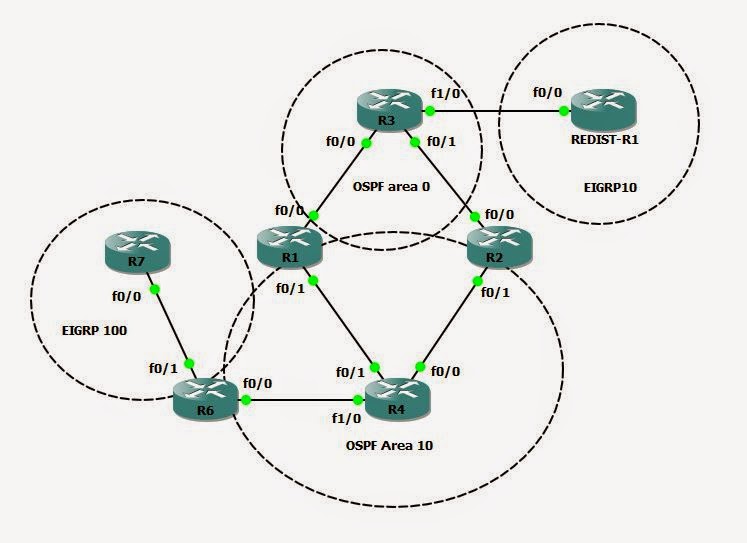
Topology:
============


Router 4 has a local route of 4.4.4.0 –
From the database on R3 you can see that I have two paths to that route – over R2 and R1.

R3#sh ip ospf database summary 4.4.4.0

            OSPF Router with ID (3.3.3.3) (Process ID 10)

                Summary Net Link States (Area 0)

  Routing Bit Set on this LSA
  LS age: 312
  Options: (No TOS-capability, DC, Upward)
  LS Type: Summary Links(Network)
  Link State ID: 4.4.4.0 (summary Network Number)
  Advertising Router: 1.1.1.1
  LS Seq Number: 80000002
  Checksum: 0xEC3D
  Length: 28
  Network Mask: /24
        TOS: 0  Metric: 2

  Routing Bit Set on this LSA
  LS age: 283
  Options: (No TOS-capability, DC, Upward)
  LS Type: Summary Links(Network)
  Link State ID: 4.4.4.0 (summary Network Number)
  Advertising Router: 2.2.2.2
  LS Seq Number: 80000002
  Checksum: 0xCE57
  Length: 28
  Network Mask: /24
        TOS: 0  Metric: 2


            OSPF Router with ID (30.30.30.3) (Process ID 50)
R3#

We can also see most of – if not all – the traffic is currenlt ygoing over R2’s FastEthernet0/1 interface.

R3#sh ip route | i IA
       D - EIGRP, EX - EIGRP external, O - OSPF, IA - OSPF inter area
O IA    2.2.2.0 [110/2] via 192.168.23.2, 00:44:28, FastEthernet0/1
O IA    4.4.4.0 [110/3] via 192.168.23.2, 00:44:28, FastEthernet0/1
O IA    4.4.5.0 [110/3] via 192.168.23.2, 00:00:53, FastEthernet0/1
O IA    4.4.7.0 [110/3] via 192.168.23.2, 00:00:43, FastEthernet0/1
O IA    20.20.20.0 [110/2] via 192.168.23.2, 00:44:28, FastEthernet0/1
O IA    10.1.14.0 [110/2] via 172.16.13.1, 00:44:28, FastEthernet0/0
O IA    10.1.24.0 [110/2] via 192.168.23.2, 00:44:28, FastEthernet0/1
O IA    11.11.11.0 [110/2] via 172.16.13.1, 00:44:28, FastEthernet0/0
R3#

I want to force all 4.4.5.4 traffic to go over R3. The rest to still go over R2.

Note: The problem with using an IGP, to implement traffic engineering is that we cannot make changes on a per prefix basis. In BGP this not true. In OSPF there’s no way to say match a certain prefix and change the cost. If we change th cost on the interface it will inherently change the cost for any route  that is using that interface.

Instead the next best path is to use the longest match for TE.

So on R2 can use a summary range for the summary address and then on R3 use a more specific longer match for the / 24 routes.

External Summarization:
This is going to be on a ASBR that is doing redistribution, when we’re generating either an External 1 or 2, or and N1 or N2 route. The N routes – are if we’re inside a not so stubby area.

Example:

From the topology – I have a redist router that is redist EIGRP into OSPF.

router ospf 10
 router-id 192.168.33.10
 log-adjacency-changes
 redistribute eigrp 10 subnets
 network 192.168.33.0 0.0.0.255 area 0

This now means that R3 will be generating a type 5 LSA or the External LSA describing the EIGRP subnets.

R3#sh ip route ospf
O E2    150.5.5.0 [110/20] via 192.168.33.10, 00:02:53, FastEthernet1/0
O E2    150.5.50.0 [110/20] via 192.168.33.10, 00:02:53, FastEthernet1/0
R3#

To verify the redistribution is actually working we can look at the # Sh ip ospf database, and look for Type 5 External routes. And we are.

This is the external LSA for the EIGRP destinations. These are either the E1 or E2 routers.

                Type-5 AS External Link States

Link ID         ADV Router      Age         Seq#       Checksum Tag
150.5.5.0       192.168.33.10   371         0x80000001 0x009ECC 0
150.5.50.0      192.168.33.10   371         0x80000001 0x00AD90 0

            OSPF Router with ID (30.30.30.3) (Process ID 50)         

You can read this like this:
192.168.33.10   is the origination router of the 150.5.x.x (eigrp routes) 150.5 .x.x are the xatual prefixes.

R3# sh ip ospf database external 150.5.5.0

            OSPF Router with ID (3.3.3.3) (Process ID 10)

                Type-5 AS External Link States

  Routing Bit Set on this LSA
  LS age: 604
  Options: (No TOS-capability, DC)
  LS Type: AS External Link
  Link State ID: 150.5.5.0 (External Network Number )
  Advertising Router: 192.168.33.10 –Advertising router
  LS Seq Number: 80000001
  Checksum: 0x9ECC
  Length: 36
  Network Mask: /24
        Metric Type: 2 (Larger than any link state path) – Metric type is 2 – means an E2 route (bt default)
        TOS: 0
        Metric: 20  - Default metric for redistribution
        Forward Address: 0.0.0.0 – This mean that for anyone in my area that wants to route to this destination – thy should route the same path that they use to reach my router-ID (192.168.33.10)
        External Route Tag: 0

            OSPF Router with ID (30.30.30.3) (Process ID 50)
R3#

From Router 4 ‘s perspective

R4#sh ip route 150.5.5.0
Routing entry for 150.5.5.0/24
  Known via "ospf 10", distance 110, metric 20, type extern 2, forward metric 3 –Metric of 20, external route  - the forward metric is the Intra-area SPF cost that the local router is using the reach the ASBR
  Last update from 10.1.24.2 on FastEthernet0/0, 00:14:16 ago
  Routing Descriptor Blocks:
    10.1.24.2, from 192.168.33.10, 00:14:16 ago, via FastEthernet0/0
      Route metric is 20, traffic share count is 1
  * 10.1.14.1, from 192.168.33.10, 00:14:16 ago, via FastEthernet0/1 – learned from
      Route metric is 20, traffic share count is 1

Note: if I have two paths to the destination we would use the forward metric to look at what was the best path to the ASBR. The forward metric is the cost inside the local area.

The LSA 5 will basically go everywhere in the OSPF area.

Note: now that we have the Type 5 LSA- is we don’t have an entry in the local DB about the ASB for that prefix – we will use the LSA type 4 – This assumes that the SPT has reachability to the ABR for the external route and it will forward them to ABR (1.1.1.1 or 2.2.2.2) and assume they can reach the destination.

Type 4 LSA’s
               Summary ASB Link States (Area 10)

Link ID         ADV Router      Age         Seq#       Checksum
192.168.33.10   1.1.1.1         1400        0x80000001 0x00EEB2
192.168.33.10   2.2.2.2         1400        0x80000001 0x00D0CC

Key – Is you want to apply Traffic Engineering the External destinations you do need to take into account the transit path along the way  - not just the redistribution metric. The only case that the redistribution metric will not matter, is if there are multiple ASBR’s originating the same route.

So – if I wanted to summarize the 150.5.x.x router to a /16 on the ABR is could simply add the sum address to the process on the ABR.

R3(config)#router ospf 10
R3(config-router)#summary-address 150.5.0.0 255.255.0.0

Then Sh ip route for Null – I should see the summary address is routed to Null0 and the summary command created the Null route.

REDIST-R1#sh ip route | i Null

O       150.5.0.0/16 is a summary, 00:00:09, Null0

Thursday, May 1, 2014

OSPF Authentication

Lessons Learned:

OSPF supports 3 types of authentication
-0 = Null
-1 = Clear Text
-2 = MD5

Can be enabled
-On all links in the area
-On a per link basis

Key – is always applied at the link level
-Virtual-Links are Area0 interfaces

--------------------------------------------------- 

From a packet level format, there’s no difference in the authentication types whether you have it enabled globally or directly at the interface level.

The only difference is if it’s enable under the process it’s going to automatically apply to any interface within that area.

Ex: Area 0 Authentication – every link in that area is going to have type 1 applied to it.
Would be the same as going to each interface and saying “ip ospf authentication”.

We can verify this by running the “ip ospf interface “ – will show what type of auth is configured.

For the password – doesn’t matter what type – it’s going to always be configure at the link level.

Note: A Virtual-Link is an area 0 interface.
If doing auth in all interfaces in Area 0 – it means a Virtual link will inherit the auth.
As long as the neighbors agree on what the authentication is – you can actually us a null for the password.

As long as the end result matches the result is successful and you can form an ADJ

Clear text Authentication:
--------------------------------

Note: this ca be enabled either under the process or the interface.
First let’s look at the interface prior to configuring any auth.

R1#sh ip ospf interface fa0/0
FastEthernet0/0 is up, line protocol is up
  Internet Address 192.168.12.1/24, Area 0
  Process ID 10, Router ID 192.168.13.1, Network Type BROADCAST, Cost: 10
  Transmit Delay is 1 sec, State DR, Priority 1
  Designated Router (ID) 192.168.13.1, Interface address 192.168.12.1
  Backup Designated router (ID) 192.168.23.2, Interface address 192.168.12.2
  Timer intervals configured, Hello 10, Dead 40, Wait 40, Retransmit 5
    oob-resync timeout 40
    Hello due in 00:00:07
  Supports Link-local Signaling (LLS)
  Index 2/2, flood queue length 0
  Next 0x0(0)/0x0(0)
  Last flood scan length is 0, maximum is 1
  Last flood scan time is 0 msec, maximum is 0 msec
  Neighbor Count is 1, Adjacent neighbor count is 1
    Adjacent with neighbor 192.168.23.2  (Backup Designated Router)
  Suppress hello for 0 neighbor(s)
R1#

Let’s turn on Clear text under the process;

R1(config-router)#area 0 authentication

Now let’s debug the ADJ on the other end of the link. We will see that any new update coming in from the neighbor – will be discard because there’s a mismatch in the Authentication type:

Output:
*Mar  1 00:17:22.567: OSPF: Rcv pkt from 192.168.12.1, FastEthernet0/0 : Mismatch Authentication type. Input packet specified type 1, we use type 0
This says locally I use type 0 – which is Null – and the neighbor uses Type1 auth which is clear text. This is not a mismatch in the password. It’s a mismatch in the type of authentication.

Not at the link level of the local router is we configured “ip ospf Authentication”. This is tuning the process on. Even though we don’t have a password configured – they neighbors are now doing clear text authentication with no key.

Output:
The ADJ now forms
R2#
*Mar  1 00:23:32.011: %OSPF-5-ADJCHG: Process 10, Nbr 192.168.13.1 on FastEthernet0/0 from LOADING to FULL, Loading Done
R2#

Also from a sh ip ospf int fa0/0 – we can now see that simple password Auth is enabled.

R2#sh ip ospf interface fastEthernet 0/0
FastEthernet0/0 is up, line protocol is up
  Internet Address 192.168.12.2/24, Area 0
  Process ID 10, Router ID 192.168.23.2, Network Type BROADCAST, Cost: 1
  Transmit Delay is 1 sec, State DR, Priority 1
  Designated Router (ID) 192.168.23.2, Interface address 192.168.12.2
  Backup Designated router (ID) 192.168.13.1, Interface address 192.168.12.1
  Timer intervals configured, Hello 10, Dead 40, Wait 40, Retransmit 5
    oob-resync timeout 40
    Hello due in 00:00:05
  Supports Link-local Signaling (LLS)
  Index 1/1, flood queue length 0
  Next 0x0(0)/0x0(0)
  Last flood scan length is 1, maximum is 1
  Last flood scan time is 0 msec, maximum is 4 msec
  Neighbor Count is 1, Adjacent neighbor count is 1
    Adjacent with neighbor 192.168.13.1  (Backup Designated Router)
  Suppress hello for 0 neighbor(s)
  Simple password authentication enabled

If we want to add a key value we can change the auth type on the link level of both neighbors.

EX: R2(config-if)#ip ospf authentication-key CISCO

Note: Be careful because most Cisco IOS versions will take white spaces as passwords.

For MD5 Authentication –
The config is essentially going to be the same –

Ex: under the link -
R1(config-if)#ip ospf authentication message-digest
R1(config-if)#ip ospf message-digest-key 10 md5 CISCO123

Note:  Just link in EIGRP the Key # does have to match because it’s part of the update.

Interface verification

R2#sh ip ospf interface fastEthernet 0/0
FastEthernet0/0 is up, line protocol is up
  Internet Address 192.168.12.2/24, Area 0
  Process ID 10, Router ID 192.168.23.2, Network Type BROADCAST, Cost: 1
  Transmit Delay is 1 sec, State DR, Priority 1
  Designated Router (ID) 192.168.23.2, Interface address 192.168.12.2
  Backup Designated router (ID) 192.168.13.1, Interface address 192.168.12.1
  Timer intervals configured, Hello 10, Dead 40, Wait 40, Retransmit 5
    oob-resync timeout 40
    Hello due in 00:00:01
  Supports Link-local Signaling (LLS)
  Index 1/1, flood queue length 0
  Next 0x0(0)/0x0(0)
  Last flood scan length is 1, maximum is 1
  Last flood scan time is 4 msec, maximum is 4 msec
  Neighbor Count is 1, Adjacent neighbor count is 1
    Adjacent with neighbor 192.168.13.1  (Backup Designated Router)
  Suppress hello for 0 neighbor(s)
  Message digest authentication enabled

    Youngest key id is 10